The bit mapped ASCII coded numbers used previously are still active – e.g. “0” = Normal control, “1” = Control may not be edited by the user, “4” = Control is a heading (boldface font and blue color), etc.
In version 1.6.139 and later, however, you may now specify other parameters for the control preceded by a backslash character.
Following is a list of these special parameters and what they control/modify:
(This list was updated to remove the parameters obsoleted by HomeSeer 2.0)
\L=number Specify the index number for the value in a list control that should be selected. For example, when the user chooses the 4th value in a list and the trigger or action is saved, HomeSeer automatically sets this value when the page is re-displayed. This may now be used however to specify a default value when the user has not chosen one yet.
\M=number Specify the number of lines for a text box (creates a multiline text box if > 1)
\N=True|False Specify that there is no New Line after this control – this allows you to place multiple controls side-by-side on one line of the HTML UI.
\O=True|False Specifies that an auto-submit should be done when this control is changed by the user – e.g. Uses the OnChange event.
\P=True|False Specifies that text entered into the text box should be displayed as a password text box – e.g. the characters typed do not appear, only asterisks. (Has no effect if \M > 1)
\V=True|False Sets Visibility of the control. Note: This is a powerful attribute modification as it is now possible to have your TriggerUI and ActionUI pages always contain the same number of controls yet change the appearance depending upon the user’s input or the configuration of the system. If you do not use this and change the number of controls on the page instead, then all actions and triggers stored by HomeSeer under the previous number of controls will not be loaded properly.
\W=number Specify the width in characters of the control. For a multi-line text box, use the \W parameter to specify the width, and \M to specify the number of lines. In the case of the combo box (drop down list), you can set the number of lines for the HTML UI using \M, but conversely, the width in the HTML UI is not settable – it is automatically set to the width of the widest entry in the list.
\E=number Expand the number of columns for the current HTML table cell by (number) columns.
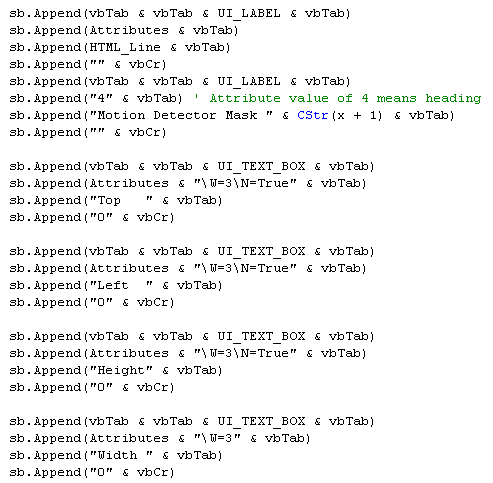
Following is an example in Visual Basic that creates 4 small text boxes side-by-side – in
this example, it is for the purpose of entering coordinates:
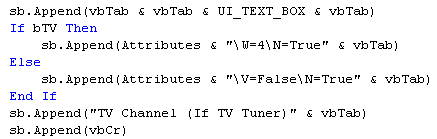
The following example shows the control only if the user has a video capture device in their system that is also a TV Tuner device:
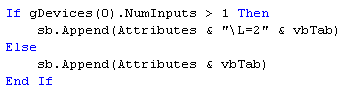
This example sets the list index to the 2nd entry in the case where a video capture device has more than one input:
 Note that in each example, these special control codes
are appended to the existing value of attributes, which is a string variable
already containing "0" or "1".
Note that in each example, these special control codes
are appended to the existing value of attributes, which is a string variable
already containing "0" or "1".