One of the biggest entry points for those beginning to build their smart home is smart lighting. Over the last 10 years there has been a lot of growth in the industry, and many prospective buyers are not initially trying to develop a smart home system but are trying to attend to a need such as mood lighting, motion detection for flood lights, or even cutting down expenses on the energy bill. With that being the case there is a great deal of confusion from the general public as to which way to approach this process, because deciding between smart switches and smart lights is not well communicated to the uninitiated. The purpose of this blog is to resolve some of the ambiguity with simple and concise advice for those of you who have it in mind to start your smart lighting journey.
Pros and Cons
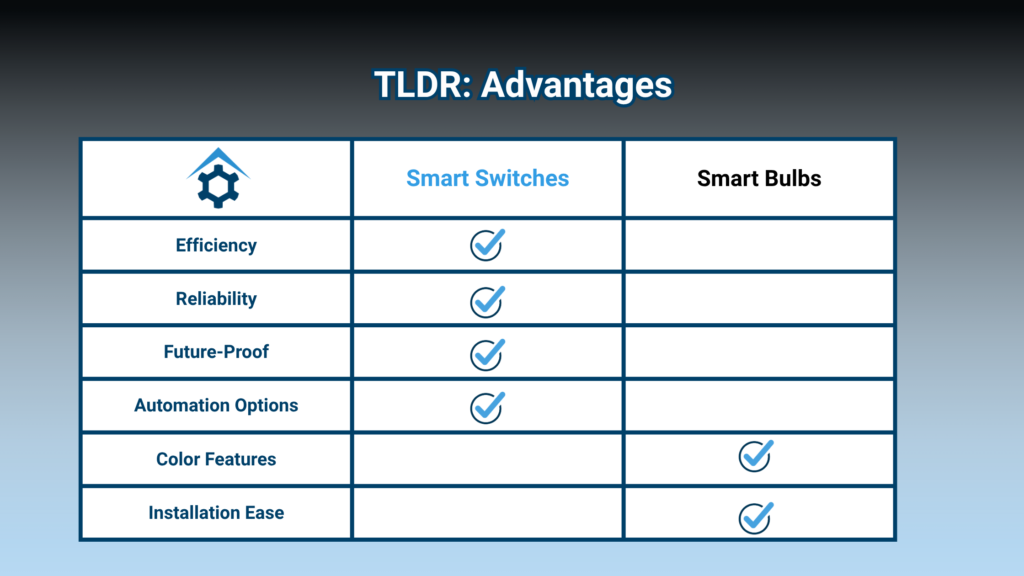
The TLDR
Definitions
- A Smart switch is an installed lighting-switch that uses a communication protocol to talk to a hub or system to control if a light is on, off, or regulates dimming.
- A Smart bulb is a light bulb that has the ability to communicate with a hub, application or system to control if the bulb is on, off, and often has features to change color and brightness.
Pros for Smart switches
Simple and efficient
Controlling lighting from the switch reduces the complexity and devices on your system. Since 1-switch can control 1 to dozens of lights the amount of end devices is severely reduced. This can reduce delays, system lag and automation failures when implemented.
Better reliability
Generally speaking, a smart switch is more troublesome to replace, but it only requires a single device replacement as opposed to the amount of smart bulbs which generally have shorter lifespans depending on how complex the unit is, and varying environmental factors. Replacing a single unit is less expensive than dozens of smart bulbs, and smart switches generally have a longer lifespan.
Easier control
Smart switches generally offer more complex automation options when compared to stand alone smart bulbs which are often tethered to whatever controls and integration options are available on the company’s application. An application that can cause errors when updating and can be made obsolete with a patch. Smart switches such as HomeSeer’s WS300 are Z-Wave based, can be used by any Z-wave platform, and has an indefinite support cycle because of Z-Wave’s backward compatibility.
Consistency
Behavior of your lighting will be more consistent with a smart switch. Smart switch implementation limits the number of end devices, can increase the signal range and fidelity through mesh networking as is the case with the WS300 and have less failure points than Smart bulbs. Overall leading to a more reliable system and experience.
Cons for Smart switches
Installation Difficulty
Installing a smart switch should only be done by someone who is experienced or a professional.
Pros for Smart bulbs
Color Options
The principal benefit of smart bulbs is their ability to change color. If you want mood lighting, red light for reducing stress on the eyes at night, color specific light for indoor gardening or green light for migraine it has its utility. But these niche applications generally do not encompass the entire home.
Cons for Smart bulbs
Reduced Performance
When using smart bulbs factors such as signal reception, the amount of end devices, limited system speed and different smart bulb models can lead to results in behavior and reliability varying throughout the home. It is not uncommon in larger systems to have some bulbs just fail to change state after an automation is run, leading one or more lights to remain off or in a different color state. As time progresses and you have to replace bulbs you will deal with subtle differences in bulb coloring and behavior that may lead to a less than ideal experience.
Strain on system
The more end devices you have in your smart home system the more data that has to be processed. Processing power is fundamentally limited and the more devices the more overburdened the system becomes.
Longevity
Each bulb is a potential failure point for your system, and their lifespan is limited. If you are designing your home lighting system off Smart bulbs you can expect to replace bulbs on a somewhat regular basis, increasing overall costs and downtime.
Wi-Fi bandwidth strain
Most smart bulbs run off of Wi-Fi, and if you use this type your bulbs will be competing with your smart TVs, computers and cell phones for bandwidth. This may have the knock on effect of slowing your Wi-Fi router for your personal devices.
Considerations and Tips for Beginners
I have found in my talks that the inexperienced user often has fundamental misunderstandings about what the experience of smart lighting will be like, and often has not considered some fundamental aspects that are crucial, leading to a disappointing experience. So I will discuss some commonly misunderstood points.
Not all smart devices natively work together
For more experienced users of smart-home technology this may be obvious, but when first getting into the hobby this is not expressly self evident. Wi-Fi devices need Wi-Fi, Z-wave needs Z-wave, Zigbee needs Zigbee. These are transmission protocols that are essentially the language each one communicates in wirelessly.
Devices need to be able to communicate with each other on the same protocol, or you have to use adapters and a specialized program/application that is capable of integrating devices that run on different protocols. Each device needs some sort of control program, be that a proprietary phone application or a specific software like HomeSeer’s HS4. These applications tell the device how to behave or interact with other devices through automations. Not all programs/applications are made equally. While a proprietary program such as Samsung’s SmartThings will work fine for Samsung products it will not be able to integrate devices that are not of that brand, and your options for creating automations will be limited. HomeSeer’s HS4 will allow you to integrate a plethora of different devices and offers much more freedom to create automations between all of your devices.
All smart lighting need conditions or inputs to work
The core difference between a smart home and a regular home is the technology reacts to your presence, conditions in the home and inputs. If you want your lights to turn on when and how you want you are going to need a ‘trigger’, which can be a physical interaction such as activating a motion sensor or a timed automation such as ‘at 9:00PM turn on porch light’. With this in mind when you purchase your smart switch or smart bulb give consideration to what ‘triggers’ you want to use to make them smart, and purchase any additional sensors you may need to make this happen.
Do not expect plug and play functionality if you are not already familiar with smart home technology
Unlike a typical light bulb or switch it is not as simple as turning the device after installation. In order to make your smart device work right you are going to have to pair the device to a program/application and create automations to get it to behave as desired. This takes a little bit of time to get familiar with, but once you do further devices and automations become much easier to add to your systems.
What do you want your smart lighting to do? And when?
It is important before making a decision to decide what you want your smart lighting to do? Do you want lights to automatically turn on? Do you want to schedule your lighting depending on the time of day? Do you want to set mood lighting?
These are all important questions to have figured out before you hit ‘buy now’, without judicious consideration you may end up with a solution that does not meet your needs.
Are you ok with never using actual switches?
When using smart bulbs when you turn a switch off it unsurprisingly turns the light off, but it is not just the light, it cuts off all power. What this means is that when you physically turn the light back on, the smart bulb has to boot up. This can lead to unintended consequences such as lag, failure to turn into the desired state, or creating downstream issues when an automation waits for a device to respond that is not powered up. This can happen unintentionally when you manually turn a light on or off out of habit, or if you have guests over. If you want to avoid these issues a smart switch is highly recommended.
Are you ok with installing a switch yourself or having a professional doing it?
Installing a bulb is much easier to install than a light-switch. So it is important to consider if you have the technical skill to install a light-switch safely, or have a trained electrician do so at your behest. This can lead to additional costs that should be considered when choosing which smart lighting is right for you.
You should probably avoid using smart bulbs and smart switches together
We do not suggest you try to get these technologies to work together on the same circuit. It creates an additional level of complexity that is not advisable. Every time a smart switch turns a smart bulb off it will cause the device to fully power down. Meaning any commands the bulb is given will not trigger, and when you turn on the light it is more likely than not to do so in its default state.
What platform do you want to use? Will you want to expand your system?
In the present day there are any number of systems to choose from, each with its own particulars, HS4, Home Assistant, Etc. Many smart devices also come with a company managed application to use their products, think SmartThings from Samsung but even IKEA has one. It can be a bit maddening because without hands-on experience the features and functions of each one is different, requiring accounts, sign in’s, updates and all of the arduous minutia we associate with our modern lived experience. You can technically run a cobbled together system by manually using multiple apps, but it is not advised. This would of course come with the burden of having many apps on your phone, clunky implementation and much less options for automation. Programs such as HS4 allow you to consolidate smart devices from many producers into a single location and develop automations in one application. This is generally a better approach if you want to grow your system over time, want more dynamic interactions between devices and want greater autonomy over the products you use every day.
WS300
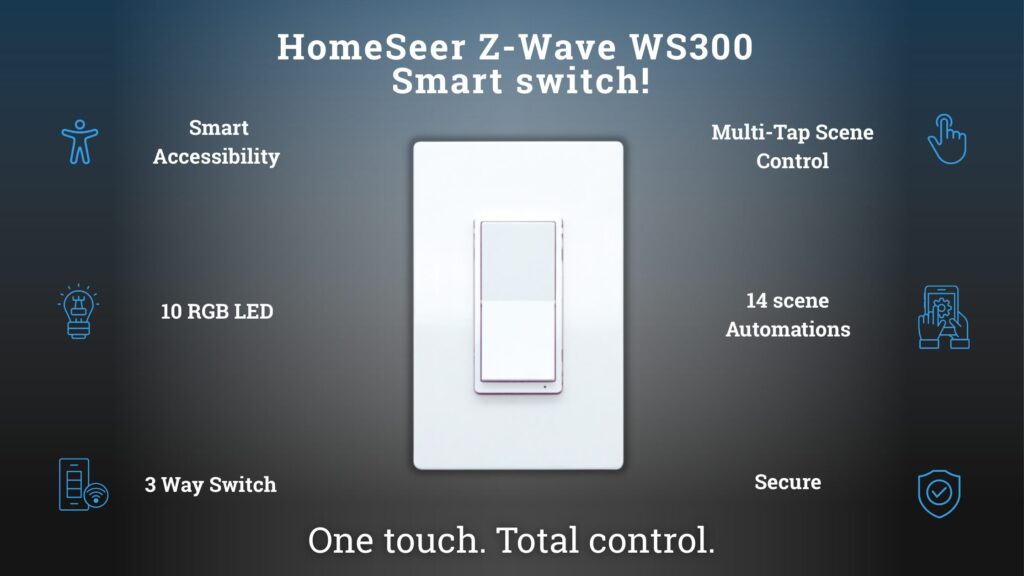
Our latest Smart switch, the WS300 boasts 3-Way switch capability, Multi-Tap home automations, and customized RGB coloration it is our most powerful Smart-Switch to date. If you are interested in updating your Smart-Lighting infrastructure, wish to upgrade to Z-Wave LR or want the convenience of accessible Multi-Tap terminals for scene creation. Click on the link for more details.